A Project Blog

Windows Explorer List-style File Browsing in Linux

by @ October 14, 2006. Filed under links, software

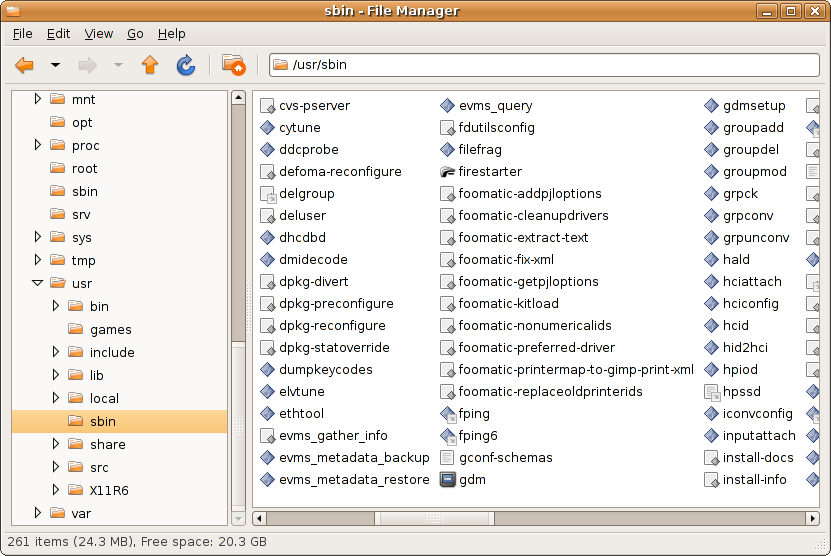
I believe my quest for the perfect GUI file manager in Linux has been fulfilled after I stumbled across a file manager named Thunar while playing with XFCE on my Ubuntu laptop. My most missed feature from browsing Windows file systems has been the “List” view. It’s is, very simply, columns of file names, with nothing else. The main file browsers of Gnome and KDE, Nautlius and Konqueror, suprisingly cannot do this, and while they come close with a lot of customization, they do not mimic Windows Explorer perfectly. Nautilus like to wrap really long file name, or only do one file per line, and Konqueror likes to add “…” to the end of long filenames, which makes it less than useful.

Thunar does both these things, and does this very quickly. Here’s a pic of what I’m so excited about (right click and hit “view image” to see the full sized pic):

thunar.png

Installing Django on Ubuntu 6.06

by @ August 31, 2006. Filed under server, software

Steps for install Django on Dapper Drake with Apache2, MySQL5, and Python2.4 already installed:

  1. sudo apt-get install libapache2-mod-python python-mysqldb python-docutils
  2. wget http://www.djangoproject.com/download/0.95/tarball/
  3. tar xfz Django-0.95.tar.gz
  4. cd Django-0.95
  5. sudo python ez_setup.py
  6. sudo python setup.py install
  7. start creating a Django app

Other notes:

My Firefox Extensions

by @ August 22, 2006. Filed under software

Since I need to reinstall all my Firefox extensions due to a hard drive failure, I’ve decided to make a list:

How to Quickly move from Typo to Wordpress

by @ July 24, 2006. Filed under server, software

After what feels like forever without a stable release, I’ve decided to move back to Wordpress. While there are some scripts out on the web to move everything over, I used the simple method, which appears to get everything except for comments and the splits in large posts. The procedure is quick:

  1. On Typo, go into the admin section, set rss feeds to 1000 or something high.
  2. On your computer, download your RSS feed to a text file (I used wget).
  3. On Wordpress, go to import, choose RSS, and find the file you downloaded.

That’s it.

Create the Perfect Rails Server in 15 Minutes

by @ May 28, 2006. Filed under rails, server, software

I recently noticed that the next release of Ubuntu Linux will be one nice Ruby on Rails platform. After their last update of Rails itself, which brought the version number up from 1.0 to 1.1.2, Ubuntu 6.06 LTS now has all the current Rails tech built in. There is no need to search the web for all the pieces and compile package after package until finding one that works. Here are the highlights:

This means that after a 10 minute server install of Ubuntu, one can uncomment the universe repo in /etc/apt/sources.list and issue the following command to setup at capable and competent Rails server environment:

sudo apt-get install ruby1.8 mysql-server rails lighttpd libmysql-ruby1.8 libfcgi-ruby1.8

Then copy your Rails app over and configure it in Lightty you’re off. Now to find a hosting company which supports Ubuntu…

Update: Rubygems can be useful, but it isn’t in the standard repos. Instead, I downloaded and compiled rubygems-0.9.0.tgz.

Update2: I removed the Ubuntu-supplied rails and instead used rails from rubygems.

Postfix for the Server

by @ March 14, 2006. Filed under server, software

I moved back to Postfix for my server’s SMTP option. Gmail’s SMTP server overwrote the ‘from’ address for every email that went out, which was annoying.

Email Move Complete

by @ March 1, 2006. Filed under server, software

I finally finished moving my email server from a self hosted setup to Gmail for Domains. There were three main parts of the move: configuring inbound email to end up on the Gmail servers, copying all my current email to Gmail, and then setting up local mail to be sent using Google’s SMTP server. The most time consuming part of the move was copying all my current mail over using a nice utility someone had written. Configing the DNS services and watching the changes propigate was the most interesting part of the move.

Postfix has been replaced with ssmtp on my server, and I now have a few extra CPU cycles and MB’s of memory to dedicate to Apache, Lighty, and MySQL.

Gmail for your domain!

by @ February 24, 2006. Filed under server, software

Just got the coolest email ever:

Welcome to our beta test!

Thanks for helping us test Gmail for your domain! We’re excited to help you offer Gmail accounts with your domain.

Here’s how to get started:

While I wasn’t sure if I really wanted to give up controlling my own mail server, I’m actually excited about it now. I’ll no longer need to keep updating my postfix+cyrus+mysql setup, which will allow me more time with Apache, Lighttpd, and MySQL. Plus the constant struggle of slowing down spam is something I’d be happy of offload. The more I think about it, the less reasons I have for not moving. Space? 2 GB is more than enough. Ads? I’ll get less spam with Gmail, at least the ads will be targeted and not stupid, if they exist at all. IMAP access? The GMail web interface is just as effienct to work with, if not more, than Thunderbird. Plus standard Gmail has at least POP access, this may even offer IMAP, I guess we’ll see.

And then there are thing which are just better all around, such as the Gmail web interface vs Squirrelmail and the spam filter which just works vs. manual tuning of spam assassin. Time to go sign up.

New MySQL, new FrozenTech

by @ February 19, 2006. Filed under rails, server, software

I felt good about my current state of the RoR FrozenTech Store so I decided to roll it out tonight. I quickly realized I would have to upgrade my MySQL from 4.0 to 4.1, something I had been putting off for a while. I followed the Gentoo upgrade docs, and they worked perfectly, but it did take over an hour to compile the new version plus all the other stuff which depened on it. That was fine though, as Christina and I watched some episodes of Battlestar from season one which we had not seen.

After everything was done compiling, I restored all the databases, checked existing sites, uploaded new files, edited apache and lighttpd config files, and restarted every service a few times. The good news is that everything looks like it’s working the way it should. There’s still a lot of tweaking that need to be done to the store and the surrounding site, but I’m looking forward to it. The Ruby on Rails environment has been fun to work with.

Rails on Lighttpd with Apache!

by @ January 21, 2006. Filed under rails, server, software

After struggling all day yesterday, I finally got my typo installs going on Lighttpd with Apache passthough. I think it was the virtual server aspect that kept messing me up, but after 4 hours yesterday, I somehow got it going after 30 seconds of work this morning.

Typo feels much faster now than when it was running on plain Apache2 + FCGI.

« Previous

Copyright ©2005-2007 Nicholas Brand. All rights reserved.
powered by WordPress.

categories:

links:

blogroll:

search:

archives:

November 2008
M T W T F S S
« Mar    
 12
3456789
10111213141516
17181920212223
24252627282930

other:

computers:

  • backupbox
  • closetbox
  • icebox
  • thinkpad
  • minibox
  • briefcasebox
  • summary
  • mythbox
  • other devices:

  • tivo
  • nokia 770
  • personal:

    Last.FM
    del.icio.us
    Digg
    Amazon Wishlist

    24 queries. 0.255 seconds